Android app downloading is a task that requires careful attention to security features to protect your phone and data from harmful software.
When downloading a new app on your mobile, we often install whatever we get without realizing it. But standing at this time of 2026, we need to strengthen our security system. Now Google Play Protect and Developer Verification system have brought major changes in the field of app downloading.

When you download an app, make sure that it comes from a reliable source. There is a risk of theft of personal information on the phone if you download the app from the wrong source. So it is wise to always use the official store.
Why download apps from the official store?
It is necessary to know why the official store is the best to keep your phone safe. Sometimes the question arises – can there be a problem if you download apps from other sources? The answer is – many times viruses or malware are hidden in unfamiliar links. Google Play Store verifies each app and then grants permission.
If you do not take the right path for Android app download, you can be in big danger. The new rules of 2026 have made it mandatory to verify the identity of developers, which was not the case before. As a result, the number of fake apps on the Play Store has now reduced a lot.
Advantages of Google Play Store
The biggest advantage of using Google Play Store is security. Every app is scanned regularly here. If something suspicious is found in an app, Google immediately removes it. Users can get an idea of the quality of the app by looking at the reviews here.
Apart from that, it is very easy to update the app here. If you are worried about whether the app is safe for your phone or not, you can confirm it by looking at the store’s star rating and number of downloads. This will keep your phone healthy and ensure the security of personal information.
New rules for developer verification
In 2026,
Google introduced a system where every app developer has to confirm their identity. It is a lot like airport security checks. If the developer is not verified, it becomes difficult to install that app.
This has largely closed the way for creating malicious apps. Now you can safely download apps from the Play Store. However, be careful, before downloading any APK file from an unknown website, check it carefully. This will ensure the security of your digital life.
Checking app permissions
Some permissions are asked for while installing an app. Many times we give
‘OK’
without reading. But think about it, why would a simple flashlight app ask for permission to
view your gallery photos or contact list? This is a red flag or danger signal.
Before downloading an Android app, check these permissions carefully. Granting unnecessary permissions can put your privacy at risk. So be aware and grant only the permissions you need.
The right rules for safe downloading
There are some general rules we need to follow to download apps safely. Below we have provided a comparison chart that will help you understand:
| Medium | Security Level | Risk |
| Google Play Store | Maximum (Verified) | Almost none |
| Third party sites | Medium | High |
| Random link clicks | Low | High |
Have you ever experienced that your phone got slow while downloading an app? This is mainly the result of downloading an app from an unsafe source. To avoid this situation, always use official channels. While downloading an Android app, make sure that it is made by a reputable company. It is a good habit to check the name of the developer. The best way is to stay away from unknown developers.
File Checking Tips
- Rating: Check if the app has a rating of at least 4.0 or higher. This gives a good idea of the quality of the app.
- Reviews: Read what others are saying. Avoid if there are negative reviews.
- Number of downloads: Apps that are downloaded more are usually safer.
- Source: Click on the developer’s name to see what other apps they have created.
If you take care of these things, your phone will be good for a long time and there will be no fear of any hacking or virus. Digital security is now in our own hands.
Warnings about using modern apps
Smartphones in 2026 are much more sensitive. So it is important to make smart decisions when Android apps downloading. Did you know that there are many apps today that use AI to understand your usage patterns?
This is fine if used for good, but dangerous if used for bad. So always use updated apps and always keep the phone’s system software on the latest version. This closes the phone’s security flaws.
Security risks in the age of AI
Currently, many phishing apps are being created with AI that look exactly like real apps. The logos and names of these apps are kept in such a way that you are confused.
Therefore, you need to be a little extra careful when Android apps downloading. Be careful if you are tempted by very attractive or free premium features. Remember, if something seems too good to be true, it is usually a scam. Keeping these things in mind will help you stay safe.
Permission Management
Check from your phone settings from time to time which app has which permissions. If you see an app that doesn’t currently need that permission, close it immediately. This controls the app’s background activity and saves your battery and data. Using your phone’s permission management system is now quite easy. If you want, you can also check the status of Google Play Protect to see how secure your phone is.
Why is it important to be careful?
We constantly use our phones to do everything from bank transactions to sharing personal photos. If there is a slight mistake while downloading an Android app, this information can be leaked. Below are some things that will strengthen your digital life:
1. Password: Use strong passwords or biometrics for use in apps.
2. Update: Update the app regularly so that new security features work.
3. Backup: Keep a regular backup of important files on Google Drive.
4. Warning: Never click on unknown links.
Here are some tips for your convenience from the table:
| Topic | Why? |
| 2-factor authentication | Increases account security several times over. |
| Using a VPN | prevents data leaks from public WiFi. |
If you follow these methods, you will be safe and secure in the digital world. Finally, it is wise to think carefully before downloading an Android app.
Security and Use of Modern Apps
Currently, the security standards for Android apps downloading have changed a lot compared to before. The smartphones we use now often have features that consume data without us knowing. Have you noticed this?
To avoid this problem, it is very important to keep the following points in mind while downloading apps. Even in this modern era of 2026, many users are increasing the risk of their personal information by downloading apps from the wrong source.
App permissions and privacy
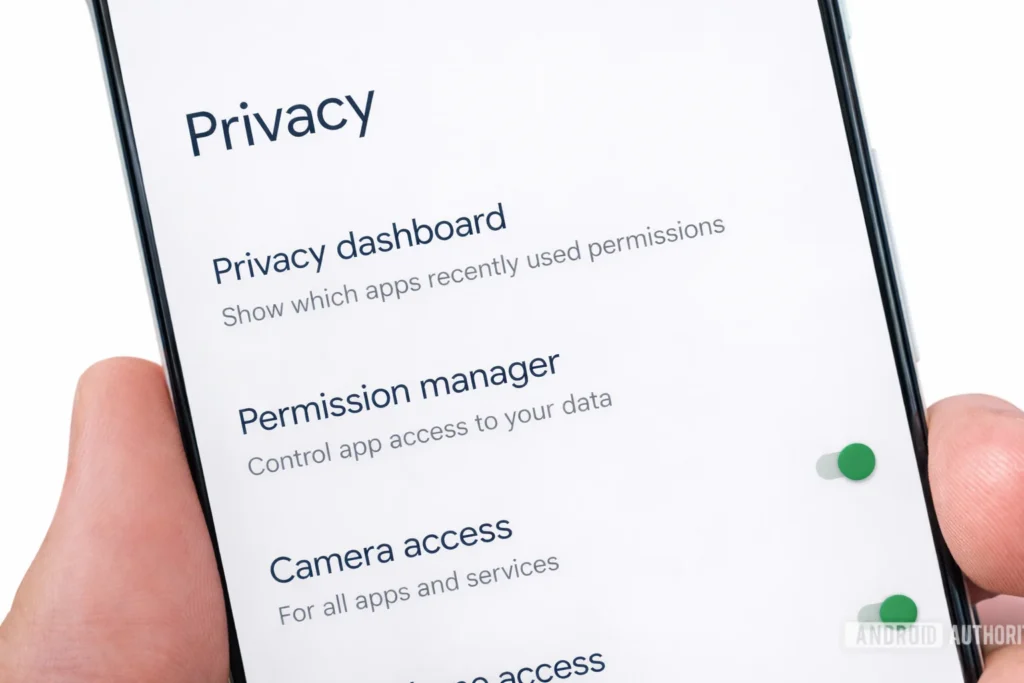
We often give ‘allow’ to all permissions while installing apps. But after downloading an Android app, have you checked whether that app has unnecessarily taken permission for your location or contact list?
This is a serious mistake. If an app wants to misuse your personal information, it can easily do so if you give it permission. Therefore, you should check the permissions from your phone settings every month as a rule.
Battery and data protection
Unnecessary apps consume your phone’s battery quickly. If you see that an app is always using data in the background, then understand that it is wasting your phone’s resources. After downloading the Android App, you can turn on ‘Restrict Background Activity’ from the app’s settings. This will help keep your phone running for a long time.
Cache File and Storage Management
Using many apps increases the phone’s cache file, which slows down the phone. Clearing cache files regularly makes the phone work faster. But be careful, do not clear the cache of all apps. Clear the cache of only those apps that store more data. This will free up your phone’s storage and increase performance.
Importance of App Updates
Are you updating the apps installed on your phone on time? Downloading an Android app does not mean that the responsibility ends, but it is much more important to keep the app updated regularly. Whenever developers find a security flaw, they quickly send an update. If you do not update, hackers can take advantage of that flaw.
Benefits of new features
With updates, you get new features, which make your work easier. Many times, it is seen that there are some problems in the old version, which are resolved through updates. While downloading an Android app, make sure that it is the latest version. Using an old version means taking security one step backward.
Auto-update settings
It is always a good idea to keep the Play Store’s auto-update feature turned on. In this case, apps will be updated only when they are connected to WiFi. This reduces your manual workload and keeps your phone up-to-date. However, in this case, it is wiser to keep updates only in WiFi mode to save data.
App maintenance and phone speed
It is very natural for the phone to slow down if you Android apps download haphazardly on your phone. Many of us store more unnecessary apps than necessary apps. Do you think that separate data storage for each app puts pressure on the phone’s processor? The answer is yes. Therefore, it is important to check the phone regularly and uninstall unnecessary apps. This will free up your phone’s storage and improve battery backup.
Effects of unnecessary apps
Do apps that you don’t use even once a month really need to be on your phone? These apps consume data regularly in the background and distract the phone by sending notifications occasionally. While Android apps downloading we download a lot of things out of emotion, but later we don’t use them anymore. Identifying and uninstalling them is the smart thing to do. This will make your phone much faster.
Phone Storage Cleaning
Go to the storage menu from the phone settings and see which app is occupying the most space. Sometimes, it is seen that even a small app has accumulated a lot of cache. After downloading an Android app, if you go to the storage option of that app and ‘clear cache’, a lot of space is freed up. If you do this regularly, there is no fear of the phone becoming slow.
System Optimization
Keep the phone’s OS (OS) always updated. Sometimes, if the system does not match the app, the phone gets hot. Therefore, in addition to Android apps downloading, it is also your responsibility to check the phone’s software update. This increases the security of the system and the performance of the app many times.
Digital Security and Awareness
In this time of 2026, we need to be more aware of cybersecurity. While Android apps downloading, be careful whether you are using a public WiFi or not. Because downloading
apps on public networks can be unsafe at times.
Always try to use personal networks. Your phone is the key to all your important information, starting from your banking, so it is essential to keep it secure.
We should remember that even though technology is at our fingertips, its proper use is the key. Small precautionary steps can protect us from major dangers. Keep your phone safe, update it regularly, and refrain from downloading apps from unknown sources. These habits will make you a smart Android user.
The key to caution in app selection
Do we who use smartphones always check the quality of the app? Most of the time, we download Android apps just by looking at the name, which can cause major digital problems in the future.
Today we will discuss how to be more careful in app selection. In this era of advanced technology in 2026, it is not only necessary to download apps, but also to pay attention to their functionality and security. Do you know how even a small app can access your phone’s system files?
App review and rating analysis
It is important to read the review section of an app carefully before downloading it. Especially, a lot can be learned from the experience of those who are using the app. If you see that the rating of an app has suddenly increased a lot, be careful. Many developers try to increase the rating using paid reviews. Therefore, you need to be aware while Android apps downloading. Find the negative comments in the reviews first, this will reveal the real limitations of the app.
Developer Profile Verification
Have you ever wondered who created the app while freeing up space on your phone? It’s easier than ever to find out about the developer’s website and other apps they have.
If the developer doesn’t have a website, it’s best to avoid it. This small thing can save you from a lot of cyber attacks before downloading an Android app. According to the 2026 security standard, verified developers always provide transparent information.
App Version History
Why is the updated version of the app so important? With each update, developers fix bugs or errors in the previous version. Have you noticed why your phone sometimes hangs when using an old version? This is mainly due to missing security patches. Regularly checking for updates will keep your phone healthy.
Why do we need to be aware?
The more apps we use in the digital world, the more our information security is at risk. If we are a little patient and check while Android apps downloading, most of the risks are reduced.
Have you ever wondered if the app that has given permission to your phone’s gallery is doing something else behind the scenes? Phishing apps often take advantage of this. So it is wiser to uninstall apps that have given unnecessary permissions.
Background data control
Go to your phone’s settings and see which app is consuming the most data. There are many apps that you don’t use, but they are still pulling data in the background.
After downloading Android apps, it is now very easy to control these things. If you want, you can turn off data access for specific apps. This will not only save your data, but also make the phone’s performance much faster than before.
Introduction to security apps
Do you need a good quality security app or anti-virus for your phone? Many people think that it slows down the phone. But if you choose the right app, it actually acts as a security wall for the phone. Are you worried about the security of your phone?
Then you can use security apps from reputable companies from the Google Play Store. However, remember that there are many fake security apps in the market, so trust only well-known companies.
App Cache and Data Delete
It is very annoying to have your phone’s cache files accumulate and fill up the memory. Clearing the cache regularly makes your phone work as fast as a new phone. Don’t forget to do these tasks regularly after downloading Android Apps. This reduces the pressure on the phone’s hardware and keeps the processor cool. Just as our phones have become modern in 2026, our maintenance methods should also be modern.
Personal precautions in the security of digital life
In the digital life that we are constantly leading through our phones, downloading Android apps is not a common task. It is directly related to your personal privacy and cyber security.
Many people think that just using antivirus keeps the phone safe, but real security starts with the user’s awareness. Have you ever noticed why an app asks for permission to use your phone’s contacts or microphone when you install it? Asking yourself this question is the first step to security.
App background activity control
Many apps are designed in such a way that they run in the background without your knowledge. This not only drains the phone’s charge, but also wastes your data traffic.
After downloading an Android app, go to the ‘App Info’ section of the phone to see how much battery or data it is consuming. If you see that the app is active in the background even though you are not using it, then revoke its permission. This is a very effective way to maintain the long-term performance of your phone.
Beware of Phishing and Malware
Currently, there are many links circulating on the Internet that take you directly to an unknown website and tempt you to download Android Apps there. Although these sites look exactly like the Play Store, they contain malware.
These can render your phone’s operating system useless and steal personal information. To avoid such situations, always trust the official store and do not download files from third-party links under any temptation.
Separate profile or safe mode for apps
Did you know that it is possible to create a ‘work profile’ or a separate user profile on your smartphone? If you want to use an experimental app, you can use it in a different place from your main profile. In this, even if the app is harmful, your personal data will be protected.
This is a very modern and effective strategy for downloading Android Apps. With this technology of 2026, we can also share the phone’s system in a way that will make our digital life much safer.
Regular updates and security patches
Smartphone software updates do not mean new features, but that is not the case. Their main function is to eliminate old security flaws in the phone. When developers release new security patches, they should be installed quickly. Have you noticed that the phone sometimes asks for updates but we ignore them?
This small laziness can sometimes be a big risk. After downloading an Android app, if you keep the app updated regularly, you can always enjoy the latest security features of the app.
Risks of public WiFi
Many of us download apps using public WiFi while sitting in restaurants or cafes. This creates an opportunity for cybercriminals.
It is very easy to steal data on public networks, so it is wisest to use your mobile data when downloading important apps or files. If you absolutely have to use public WiFi, you can use a good quality VPN. This will keep your online activities encrypted and protect them from third-party surveillance.
Conclusion
As a result, smartphones have become an integral part of our lives. We depend on apps for hundreds of tasks every day. Therefore, it is our responsibility to ensure the security of our information through these apps.
Small steps like using the official store when downloading Android apps, reading reviews, verifying the developer, and regularly checking permissions can protect you from major dangers. In the era of advanced technology in 2026, security systems have become much stronger than before, but there is no substitute for our awareness as users.
It is your responsibility to ensure that the phone in your hand is a source of convenience for you, not a source of risk. Build a smart life by using modern technology and always keep your digital information safe.